
Fusion-UnMult
AI-摘要
切换
Tianli GPT
AI初始化中...
介绍自己
生成本文简介
推荐相关文章
前往主页
前往tianli博客
UnMult介绍
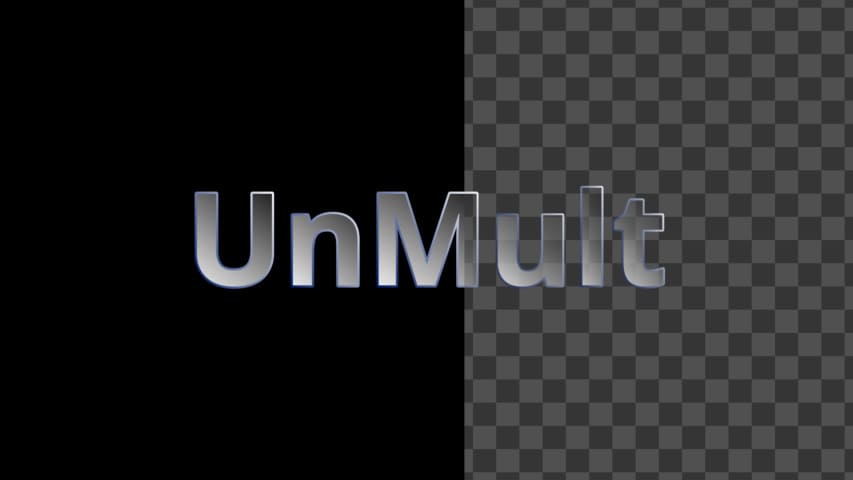
Unmult是AE的一款去除黑底或者白底的插件,对于光效粒子等素材的效果很好。
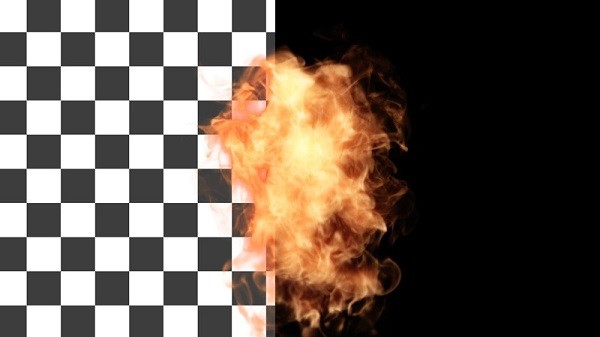
去黑底
在 Fuison里实现这个效果非常简单,因为有颜色的地方 RGB都大于 0,而让图像透明的方式就是让 RGB通道去乘以 A通道。
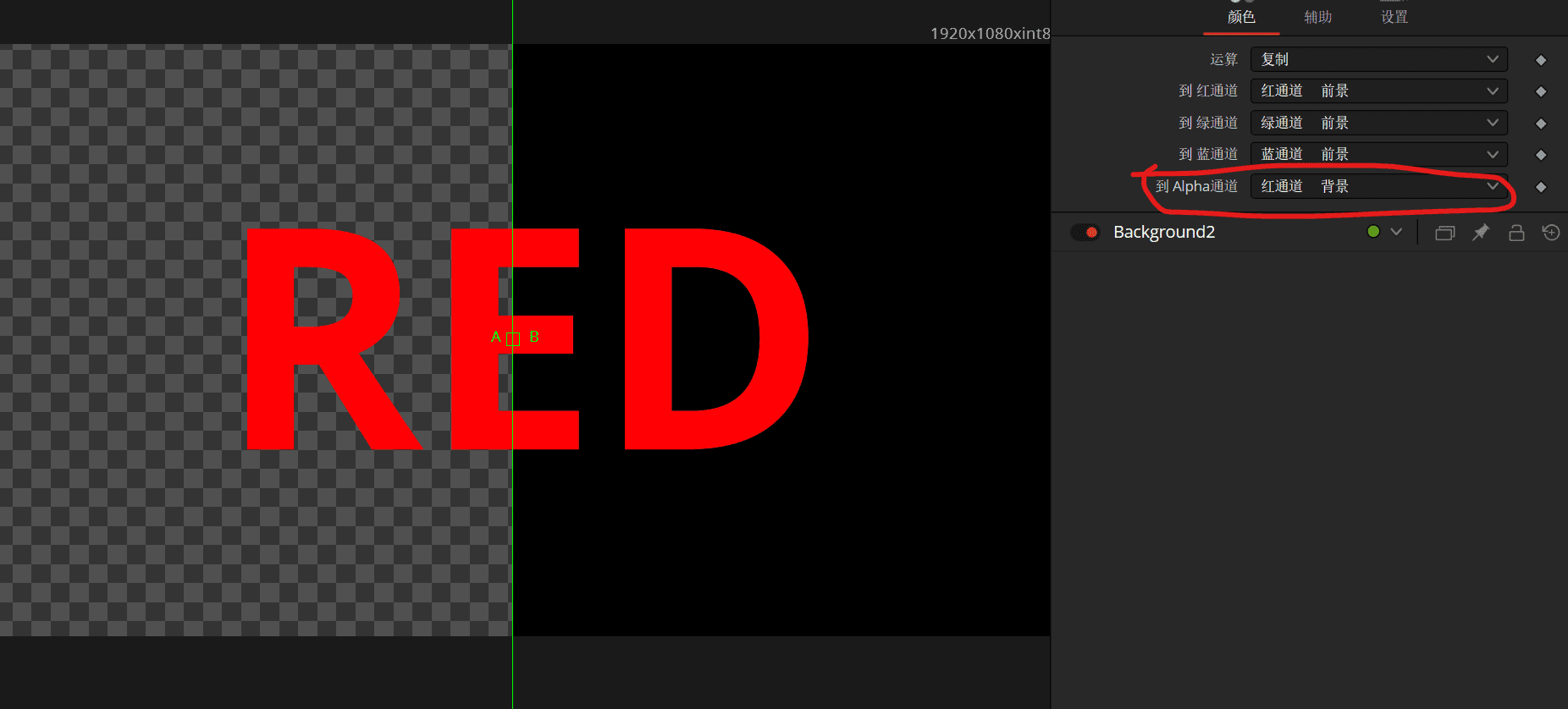
举个例子,一个黑底纯红色的字,只要把 红通道复制到 A通道黑底就会被抠掉。
同理我们只要把 RGB通道都复制到 A通道就行了。
但因为 A通道只有一个,只取三个通道的最大值就行了 max(r1,g1,b1)。
还可以加上一个 n1,也就是 Numbe ln1的值,用来给去黑效果设置强度。
max(x,...) 取最大值
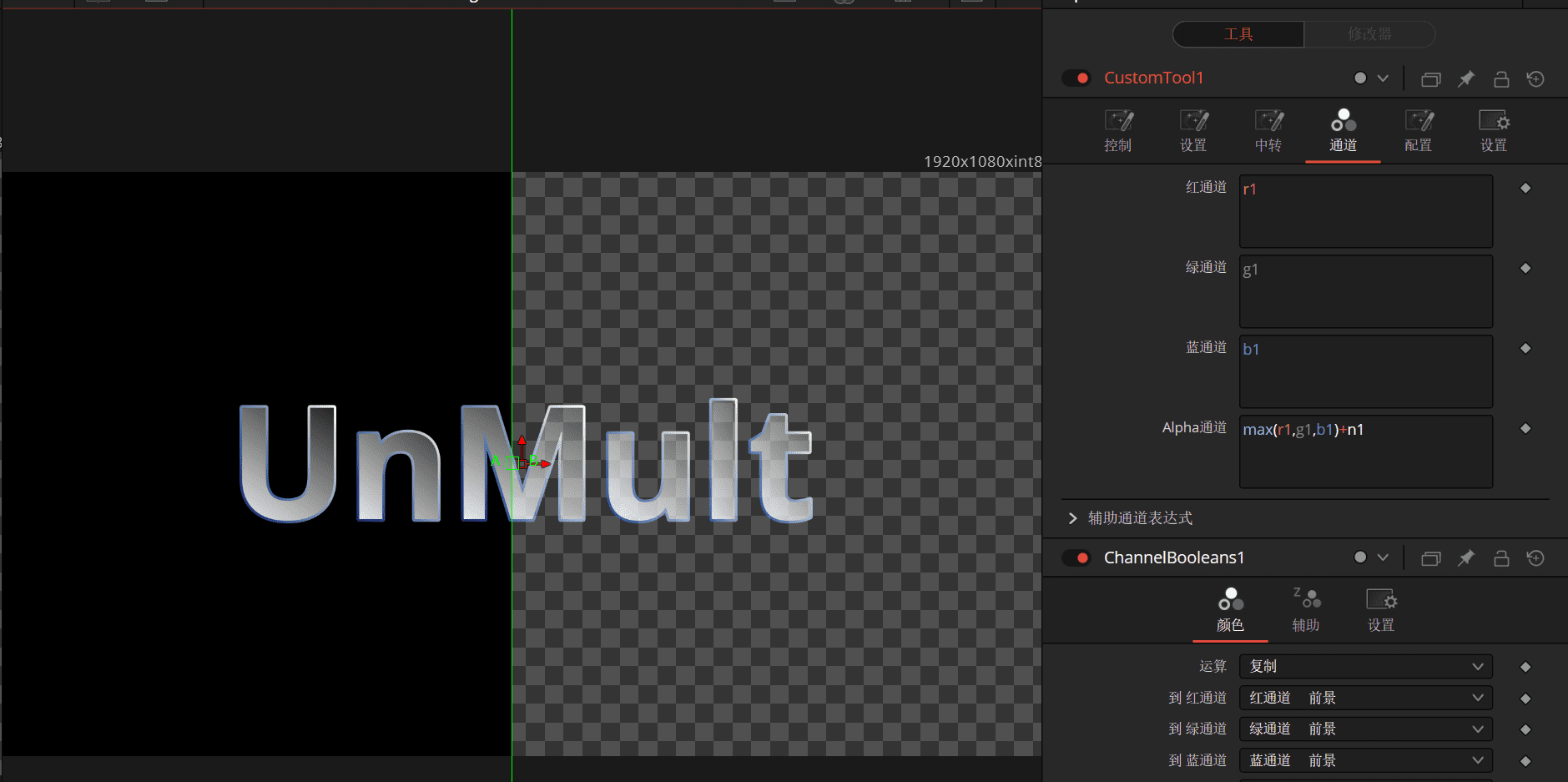
最后加上 预除和 预乘节点就行了(以防原来的图像A通道不等于1)。

{
	Tools = ordered() {
		Merge1 = Merge {
			Inputs = {
				Background = Input {
					SourceOp = "Background1",
					Source = "Output",
				},
				Foreground = Input {
					SourceOp = "Text1",
					Source = "Output",
				},
				PerformDepthMerge = Input { Value = 0, },
			},
			ViewInfo = OperatorInfo { Pos = { 660, 82.5 } },
		},
		Text1 = TextPlus {
			CtrlWZoom = false,
			Inputs = {
				Width = Input { Value = 1920, },
				Height = Input { Value = 1080, },
				["Gamut.SLogVersion"] = Input { Value = FuID { "SLog2" }, },
				LayoutRotation = Input { Value = 1, },
				TransformRotation = Input { Value = 1, },
				SelectElement = Input { Value = 1, },
				Select = Input { Value = 1, },
				Enabled2 = Input { Value = 1, },
				Type1 = Input { Value = 2, },
				ShadingMappingAngle1 = Input { Value = 159.1, },
				Softness1 = Input { Value = 1, },
				StyledText = Input { Value = "UnMult", },
				Font = Input { Value = "Open Sans", },
				Style = Input { Value = "Bold", },
				Size = Input { Value = 0.2559, },
				VerticalJustificationNew = Input { Value = 3, },
				HorizontalJustificationNew = Input { Value = 3, },
				Type2 = Input { Value = 2, },
				ShadingGradient2 = Input {
					Value = Gradient {
						Colors = {
							[0] = { 0, 0.106752, 0.417, 1 },
							[1] = { 1, 1, 1, 1 }
						}
					},
				},
				ShadingMappingAngle2 = Input { Value = -41.7, },
				Softness2 = Input { Value = 1, },
			},
			ViewInfo = OperatorInfo { Pos = { 550, 82.5 } },
		},
		Background1 = Background {
			Inputs = {
				Width = Input { Value = 1920, },
				Height = Input { Value = 1080, },
				["Gamut.SLogVersion"] = Input { Value = FuID { "SLog2" }, },
			},
			ViewInfo = OperatorInfo { Pos = { 660, 49.5 } },
		},
		AlphaDivide1 = AlphaDivide {
			CtrlWZoom = false,
			Inputs = {
				Input = Input {
					SourceOp = "Merge1",
					Source = "Output",
				},
			},
			ViewInfo = OperatorInfo { Pos = { 825, 82.5 } },
		},
		CustomTool1 = Custom {
			Inputs = {
				LUTIn1 = Input {
					SourceOp = "CustomTool1LUTIn1",
					Source = "Value",
				},
				LUTIn2 = Input {
					SourceOp = "CustomTool1LUTIn2",
					Source = "Value",
				},
				LUTIn3 = Input {
					SourceOp = "CustomTool1LUTIn3",
					Source = "Value",
				},
				LUTIn4 = Input {
					SourceOp = "CustomTool1LUTIn4",
					Source = "Value",
				},
				AlphaExpression = Input { Value = "max(r1,g1,b1)+n1", },
				Image1 = Input {
					SourceOp = "AlphaDivide1",
					Source = "Output",
				},
			},
			ViewInfo = OperatorInfo { Pos = { 990, 82.5 } },
		},
		CustomTool1LUTIn1 = LUTBezier {
			KeyColorSplines = {
				[0] = {
					[0] = { 0, RH = { 0.333333333333333, 0.333333333333333 }, Flags = { Linear = true } },
					[1] = { 1, LH = { 0.666666666666667, 0.666666666666667 }, Flags = { Linear = true } }
				}
			},
			SplineColor = { Red = 204, Green = 0, Blue = 0 },
			CtrlWZoom = false,
		},
		CustomTool1LUTIn2 = LUTBezier {
			KeyColorSplines = {
				[0] = {
					[0] = { 0, RH = { 0.333333333333333, 0.333333333333333 }, Flags = { Linear = true } },
					[1] = { 1, LH = { 0.666666666666667, 0.666666666666667 }, Flags = { Linear = true } }
				}
			},
			SplineColor = { Red = 0, Green = 204, Blue = 0 },
			CtrlWZoom = false,
		},
		CustomTool1LUTIn3 = LUTBezier {
			KeyColorSplines = {
				[0] = {
					[0] = { 0, RH = { 0.333333333333333, 0.333333333333333 }, Flags = { Linear = true } },
					[1] = { 1, LH = { 0.666666666666667, 0.666666666666667 }, Flags = { Linear = true } }
				}
			},
			SplineColor = { Red = 0, Green = 0, Blue = 204 },
			CtrlWZoom = false,
		},
		CustomTool1LUTIn4 = LUTBezier {
			KeyColorSplines = {
				[0] = {
					[0] = { 0, RH = { 0.333333333333333, 0.333333333333333 }, Flags = { Linear = true } },
					[1] = { 1, LH = { 0.666666666666667, 0.666666666666667 }, Flags = { Linear = true } }
				}
			},
			SplineColor = { Red = 204, Green = 204, Blue = 204 },
			CtrlWZoom = false,
		},
		AlphaMultiply1 = AlphaMultiply {
			CtrlWZoom = false,
			Inputs = {
				Input = Input {
					SourceOp = "CustomTool1",
					Source = "Output",
				},
			},
			ViewInfo = OperatorInfo { Pos = { 1155, 82.5 } },
		}
	},
	ActiveTool = "AlphaMultiply1"
}
去白底
和黑底差不多,纯白的RGB都等于1 。
所以只要让RGB都等于1时就设置为A通道,但这样是去掉其他颜色,
在加上一个-1就可以反过来,还可以再加个n1设置强度。
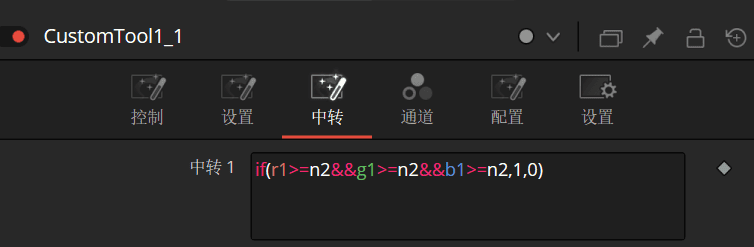
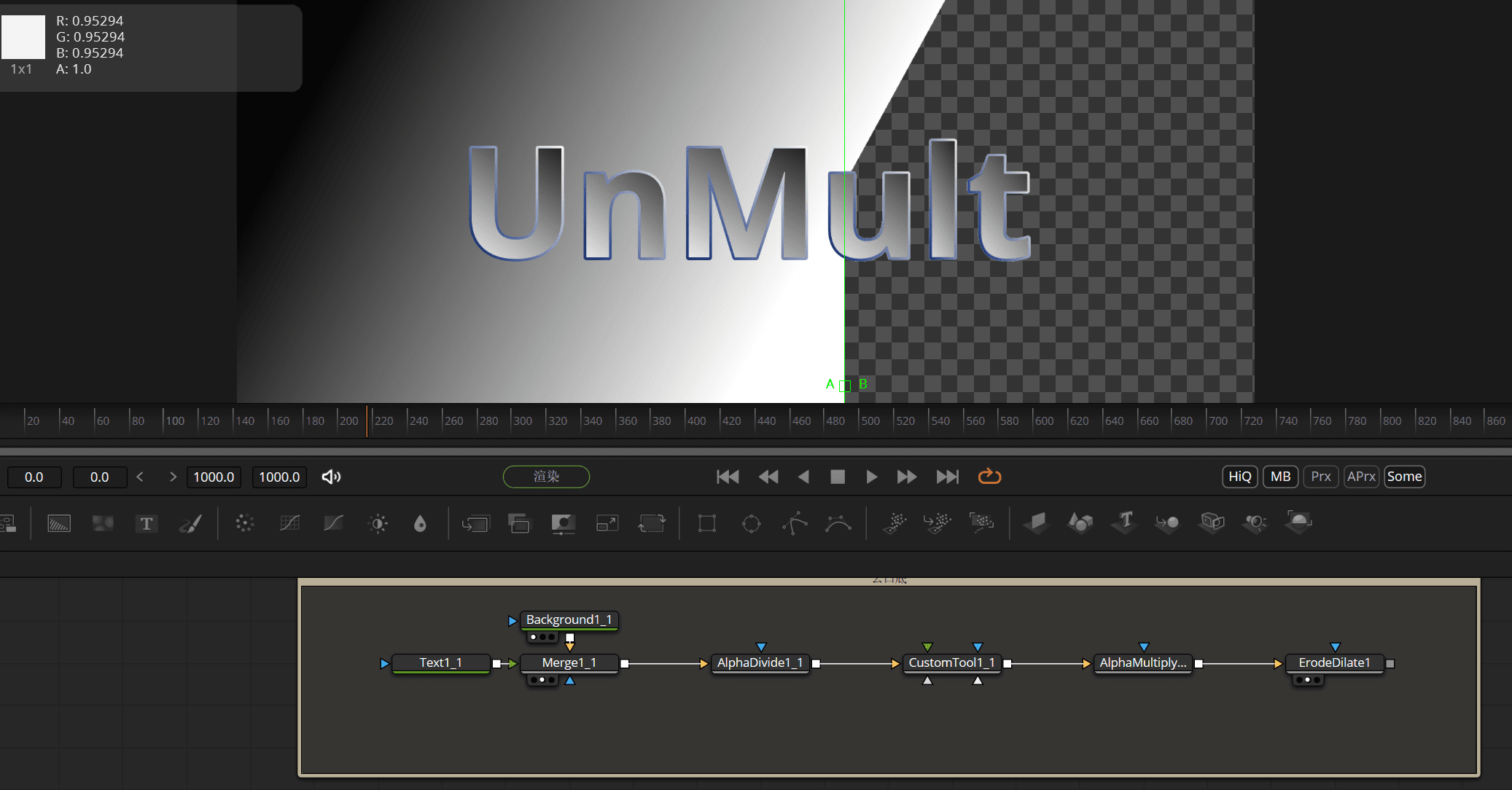
n2用来控制抠像的阈值,等于1就是纯白,0.5就是中灰。
最后再加上 预除和 预乘节点和 扩边节点就行了(扩边节点用来扣除一些毛边)
{
	Tools = ordered() {
		Merge1_1 = Merge {
			Inputs = {
				Background = Input {
					SourceOp = "Background1_1",
					Source = "Output",
				},
				Foreground = Input {
					SourceOp = "Text1_1",
					Source = "Output",
				},
				PerformDepthMerge = Input { Value = 0, },
			},
			ViewInfo = OperatorInfo { Pos = { 605, 313.5 } },
		},
		Text1_1 = TextPlus {
			Inputs = {
				Width = Input { Value = 1920, },
				Height = Input { Value = 1080, },
				["Gamut.SLogVersion"] = Input { Value = FuID { "SLog2" }, },
				LayoutRotation = Input { Value = 1, },
				TransformRotation = Input { Value = 1, },
				SelectElement = Input { Value = 1, },
				Select = Input { Value = 1, },
				Enabled2 = Input { Value = 1, },
				Type1 = Input { Value = 2, },
				ShadingMappingAngle1 = Input { Value = 159.1, },
				Softness1 = Input { Value = 1, },
				StyledText = Input { Value = "UnMult", },
				Font = Input { Value = "Open Sans", },
				Style = Input { Value = "Bold", },
				Size = Input { Value = 0.2559, },
				VerticalJustificationNew = Input { Value = 3, },
				HorizontalJustificationNew = Input { Value = 3, },
				Type2 = Input { Value = 2, },
				ShadingGradient2 = Input {
					Value = Gradient {
						Colors = {
							[0] = { 0, 0.106752, 0.417, 1 },
							[1] = { 1, 1, 1, 1 }
						}
					},
				},
				ShadingMappingAngle2 = Input { Value = -41.7, },
				Softness2 = Input { Value = 1, },
			},
			ViewInfo = OperatorInfo { Pos = { 495, 313.5 } },
		},
		AlphaDivide1_1 = AlphaDivide {
			Inputs = {
				Input = Input {
					SourceOp = "Merge1_1",
					Source = "Output",
				},
			},
			ViewInfo = OperatorInfo { Pos = { 770, 313.5 } },
		},
		Background1_1 = Background {
			CtrlWZoom = false,
			Inputs = {
				Width = Input { Value = 1920, },
				Height = Input { Value = 1080, },
				["Gamut.SLogVersion"] = Input { Value = FuID { "SLog2" }, },
				Type = Input { Value = FuID { "Gradient" }, },
				TopLeftRed = Input { Value = 1, },
				TopLeftGreen = Input { Value = 1, },
				TopLeftBlue = Input { Value = 1, },
				End = Input { Value = { 0.453313253012048, 0.0588235294117647 }, },
			},
			ViewInfo = OperatorInfo { Pos = { 605, 280.5 } },
		},
		CustomTool1_1 = Custom {
			Inputs = {
				NumberIn2 = Input { Value = 1, },
				LUTIn1 = Input {
					SourceOp = "CustomTool1_1LUTIn1",
					Source = "Value",
				},
				LUTIn2 = Input {
					SourceOp = "CustomTool1_1LUTIn2",
					Source = "Value",
				},
				LUTIn3 = Input {
					SourceOp = "CustomTool1_1LUTIn3",
					Source = "Value",
				},
				LUTIn4 = Input {
					SourceOp = "CustomTool1_1LUTIn4",
					Source = "Value",
				},
				Intermediate1 = Input { Value = "if(r1>=n2&&g1>=n2&&b1>=n2,1,0)", },
				Intermediate2 = Input { Value = "if(max(r1,g1,b1)>=n2,1,0)", },
				AlphaExpression = Input { Value = "1-i2+n1", },
				Image1 = Input {
					SourceOp = "AlphaDivide1_1",
					Source = "Output",
				},
			},
			ViewInfo = OperatorInfo { Pos = { 935, 313.5 } },
		},
		CustomTool1_1LUTIn1 = LUTBezier {
			KeyColorSplines = {
				[0] = {
					[0] = { 0, RH = { 0.333333333333333, 0.333333333333333 }, Flags = { Linear = true } },
					[1] = { 1, LH = { 0.666666666666667, 0.666666666666667 }, Flags = { Linear = true } }
				}
			},
			SplineColor = { Red = 204, Green = 0, Blue = 0 },
			CtrlWZoom = false,
		},
		CustomTool1_1LUTIn2 = LUTBezier {
			KeyColorSplines = {
				[0] = {
					[0] = { 0, RH = { 0.333333333333333, 0.333333333333333 }, Flags = { Linear = true } },
					[1] = { 1, LH = { 0.666666666666667, 0.666666666666667 }, Flags = { Linear = true } }
				}
			},
			SplineColor = { Red = 0, Green = 204, Blue = 0 },
			CtrlWZoom = false,
		},
		CustomTool1_1LUTIn3 = LUTBezier {
			KeyColorSplines = {
				[0] = {
					[0] = { 0, RH = { 0.333333333333333, 0.333333333333333 }, Flags = { Linear = true } },
					[1] = { 1, LH = { 0.666666666666667, 0.666666666666667 }, Flags = { Linear = true } }
				}
			},
			SplineColor = { Red = 0, Green = 0, Blue = 204 },
			CtrlWZoom = false,
		},
		CustomTool1_1LUTIn4 = LUTBezier {
			KeyColorSplines = {
				[0] = {
					[0] = { 0, RH = { 0.333333333333333, 0.333333333333333 }, Flags = { Linear = true } },
					[1] = { 1, LH = { 0.666666666666667, 0.666666666666667 }, Flags = { Linear = true } }
				}
			},
			SplineColor = { Red = 204, Green = 204, Blue = 204 },
			CtrlWZoom = false,
		},
		AlphaMultiply1_1 = AlphaMultiply {
			Inputs = {
				Input = Input {
					SourceOp = "CustomTool1_1",
					Source = "Output",
				},
			},
			ViewInfo = OperatorInfo { Pos = { 1100, 313.5 } },
		},
		ErodeDilate1 = ErodeDilate {
			CtrlWZoom = false,
			Inputs = {
				XAmount = Input { Value = -0.00027, },
				ClippingMode = Input { Value = FuID { "None" }, },
				Input = Input {
					SourceOp = "AlphaMultiply1_1",
					Source = "Output",
				},
			},
			ViewInfo = OperatorInfo { Pos = { 1265, 313.5 } },
		}
	}
}
把节点打包起来就可以当AE的 UnMult插件用了。
- 感谢你赐予我前进的力量
-
 微信
微信  支付宝
支付宝
赞赏者名单
因为你们的支持让我意识到写文章的价值🙏
本文是原创文章,采用 CC BY-NC-ND 4.0 协议,完整转载请注明来自 Dio云玩家
阅读建议
评论
隐私政策
你无需删除空行,直接评论以获取最佳展示效果